

Fotos: Sema
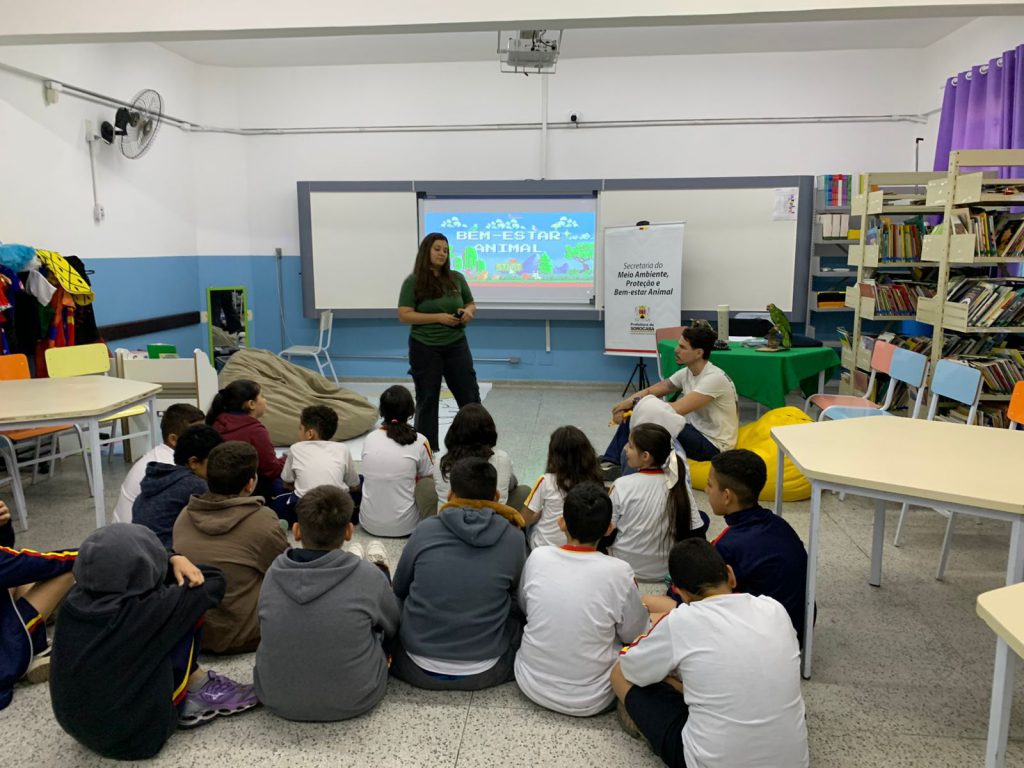
Cerca de 130 estudantes da E.M. “Prof. Benedicto José Nunes” (Parque Esmeralda) e da E.M. “Prof. Dirceu Ferreira da Silva” (Caguaçu) participaram, na última quinta-feira (14), das atividades do projeto Educação Ambiental nas Escolas, com o tema bem-estar animal.
Realizada pela Prefeitura de Sorocaba, por meio da Secretaria do Meio Ambiente, Proteção e Bem-Estar Animal (Sema), a atividade retomou a programação do segundo semestre e teve como objetivo sensibilizá-los sobre a importância do cuidado, respeito e proteção aos animais.
De forma leve e divertida, a equipe da Sema explicou sobre cuidados com os pets, as diferenças entre animais domésticos e silvestres e também sobre os cinco pilares que orientam o bem-estar dos animais: livre de fome e sede, de desconforto, de dor e doenças, além da liberdade em poder expressar o comportamento natural e livre de medo e estresse.
O projeto foi atualizado e adaptado pela Sema para uma linguagem mais lúdica, atraindo a atenção dos alunos. Os estudantes, utilizando o game Bem Estar Animal 2.0, participaram como jogadores e, em cada fase, aprenderam mais sobre os cuidados com os animais, adoção responsável e maus-tratos, incluindo como denunciar casos na cidade.
A programação educativa é levada semanalmente, sempre às quintas-feiras, às escolas municipais de Sorocaba, com um dos dois temas: bem-estar animal e bem-estar verde. Mais informações podem ser obtidas junto à Secretaria do Meio Ambiente, Proteção e Bem-Estar Animal, de segunda a sexta-feira, das 9h às 16h, pelo e-mail: sema@sorocaba.sp.gov.br.


$$ = $.noConflict();
var initPhotoSwipeFromDOM = function(gallerySelector) {
// parse slide data (url, title, size …) from DOM elements
// (children of gallerySelector)
var parseThumbnailElements = function(el) {
var thumbElements = el.childNodes,
numNodes = thumbElements.length,
items = [],
figureEl,
childElements,
linkEl,
size,
item;
for(var i = 0; i < numNodes; i++) {
figureEl = thumbElements[i]; //
// include only element nodes
if(figureEl.nodeType !== 1) {
continue;
}
linkEl = figureEl.children[0]; // element
linkEl = figureEl; // element
// console.log(linkEl);
size = linkEl.getAttribute(‘data-size’).split(‘x’);
// create slide object
item = {
src: linkEl.getAttribute(‘href’),
w: parseInt(size[0], 10),
h: parseInt(size[1], 10)
};
if(figureEl.children.length > 1) {
//
item.title = figureEl.children[1].innerHTML;
}
if(linkEl.children.length > 0) {
// thumbnail element, retrieving thumbnail url
item.msrc = linkEl.children[0].getAttribute(‘src’);
}
item.el = figureEl; // save link to element for getThumbBoundsFn
items.push(item);
}
return items;
};
// find nearest parent element
var closest = function closest(el, fn) {
return el && ( fn(el) ? el : closest(el.parentNode, fn) );
};
// triggers when user clicks on thumbnail
var onThumbnailsClick = function(e) {
e = e || window.event;
e.preventDefault ? e.preventDefault() : e.returnValue = false;
var eTarget = e.target || e.srcElement;
var clickedListItem = closest(eTarget, function(el) {
return el.tagName === ‘FIGURE’;
});
clickedListItem = eTarget.parentNode;
if(!clickedListItem) {
return;
}
// find index of clicked item
var clickedGallery = clickedListItem.parentNode,
childNodes = clickedListItem.parentNode.childNodes,
numChildNodes = childNodes.length,
nodeIndex = 0,
index;
for (var i = 0; i = 0) {
openPhotoSwipe( index, clickedGallery );
}
return false;
};
// parse picture index and gallery index from URL (#&pid=1&gid=2)
var photoswipeParseHash = function() {
var hash = window.location.hash.substring(1),
params = {};
if(hash.length < 5) {
return params;
}
var vars = hash.split('&');
for (var i = 0; i < vars.length; i++) {
if(!vars[i]) {
continue;
}
var pair = vars[i].split('=');
if(pair.length getThumbBoundsFn section of docs for more info
var thumbnail = items[index].el.getElementsByTagName(‘img’)[0], // find thumbnail
pageYScroll = window.pageYOffset || document.documentElement.scrollTop,
rect = thumbnail.getBoundingClientRect();
return {x:rect.left, y:rect.top + pageYScroll, w:rect.width};
},
shareButtons: [
{id:’download’, label:’Download image’, url:”, download:true}
],
// history & focus options are disabled on CodePen
// remove these lines in real life:
historyEnabled: false,
focus: false
};
if(disableAnimation) {
options.showAnimationDuration = 0;
}
// Pass data to PhotoSwipe and initialize it
gallery = new PhotoSwipe( pswpElement, PhotoSwipeUI_Default, items, options);
gallery.init();
};
// loop through all gallery elements and bind events
var galleryElements = document.querySelectorAll( gallerySelector );
for(var i = 0, l = galleryElements.length; i 0 && hashData.gid > 0) {
openPhotoSwipe( hashData.pid – 1 , galleryElements[ hashData.gid – 1 ], true );
}
};
// execute above function
initPhotoSwipeFromDOM(‘.pms-galeria’);
// All images need to be loaded for this plugin to work so
// we end up waiting for the whole window to load in this example
$$(window).load(function () {
$$(document).ready(function(){
collage();
$$(‘.pms-galeria’).collageCaption();
});
});
// Here we apply the actual CollagePlus plugin
function collage() {
$$(‘.pms-galeria img’).css(‘display’, ‘block’);
$$(‘.pms-galeria’).removeWhitespace().collagePlus({
‘fadeSpeed’ : 2000,
‘targetHeight’ : 150,
‘effect’ : ‘default’,
‘direction’ : ‘vertical’,
‘allowPartialLastRow’ : true
});
};
// This is just for the case that the browser window is resized
var resizeTimer = null;
$$(window).bind(‘resize’, function() {
// hide all the images until we resize them
$$(‘.pms-galeria .Image_Wrapper’).css(“opacity”, 0);
// set a timer to re-apply the plugin
if (resizeTimer) clearTimeout(resizeTimer);
resizeTimer = setTimeout(collage, 200);
});
Fonte: Prefeitura de Sorocaba